
My Website Looks Outdated. Should I Redesign It?
Find Out What Makes a Website Feel Old and Which Updates Are Worth Making.

How Can I Tell Whether My Small Business Website Needs an Update?
Open the website on a phone and try to complete the same tasks a customer would. Can you understand the service within a few seconds? Is the phone number easy to tap? Can you find pricing, service areas, and contact information? Does the form work without zooming or excessive scrolling?
Next, inspect the homepage and key service pages on desktop. Look for inconsistent headings, old promotions, stock images that do not reflect the business, crowded sections, and competing buttons. Ask someone unfamiliar with the company to describe what it does after viewing the homepage briefly. Confusion is often more important than whether a design follows the latest trend.
What Makes a Website Look Modern and Professional?
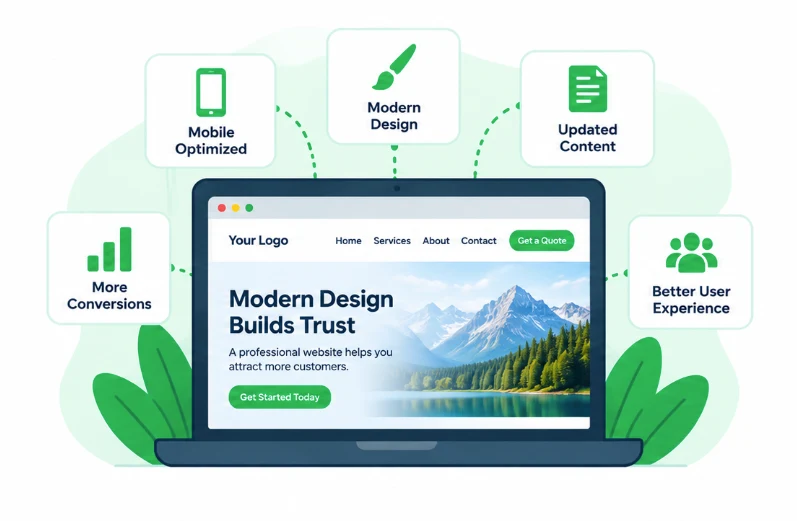
Modern design is not necessarily flashy. Effective small business websites usually have a clear visual hierarchy, readable typography, consistent spacing, strong contrast, appropriately sized images, intuitive navigation, and obvious next steps. A restrained color palette and consistent button styles can make an existing website feel much more polished.
Use genuine business photography when available. Real team, project, and location photos can communicate more credibility than generic imagery. Keep image files appropriately compressed and sized so the visual improvements do not create a slow-loading website.
Does an Outdated Website Hurt My Business?
A confusing or difficult-to-use website can discourage visitors from contacting a business, even if the business itself provides excellent service. Outdated contact information, broken forms, and hard-to-read mobile layouts create practical obstacles. The goal is not to impress people with design effects; it is to help them quickly understand your value and take action.
How Do I Improve My Website's Mobile Design?
Review the site at multiple screen widths, not just in a desktop editor's mobile preview. Check navigation menus, text size, tap targets, image cropping, form fields, and any side-by-side content that stacks on smaller screens. Avoid placing essential information inside hover effects that mobile visitors cannot easily trigger.
Test actual devices where possible. Make sure buttons are not hidden by sticky elements and that visitors can reach the contact form without unnecessary steps.
What Should Be on a Modern Small Business Homepage?
A useful homepage generally explains what the business does, who it serves, where it operates if relevant, and what visitors should do next. Supporting sections can highlight services, differentiators, authentic reviews, recent work, and frequently asked questions. Not every homepage needs every element. Choose sections that answer real customer questions and support the primary conversion goal.
Can I Modernize WordPress Without Changing Themes?
Often, yes. Existing page-builder layouts or block templates may allow updates to spacing, typography, imagery, navigation, and calls to action. Before changing themes, check whether the current tools can deliver the desired result cleanly. Avoid piling on plugins or custom code simply to imitate a design that the existing setup cannot reasonably support.
Should I Refresh My Website or Rebuild It?
Choose a website refresh when the site works reliably and its structure still makes sense. Updating typography, spacing, photos, navigation, calls to action, and mobile layouts can make a substantial difference without replacing the entire site.
Consider a redesign when the navigation and page structure no longer fit the business, the site is difficult to manage, the mobile experience is consistently poor, or the existing theme and templates prevent reasonable improvements. A redesign is also an opportunity to organize services and content around what customers actually need.
Do not redesign just because the website is old. Some older websites work extremely well. Compare the site against current business goals, visitor behavior, technical limitations, and the cost of maintaining the current setup. Preserve useful content and working features whenever possible.
Why Does My Website Look Outdated?
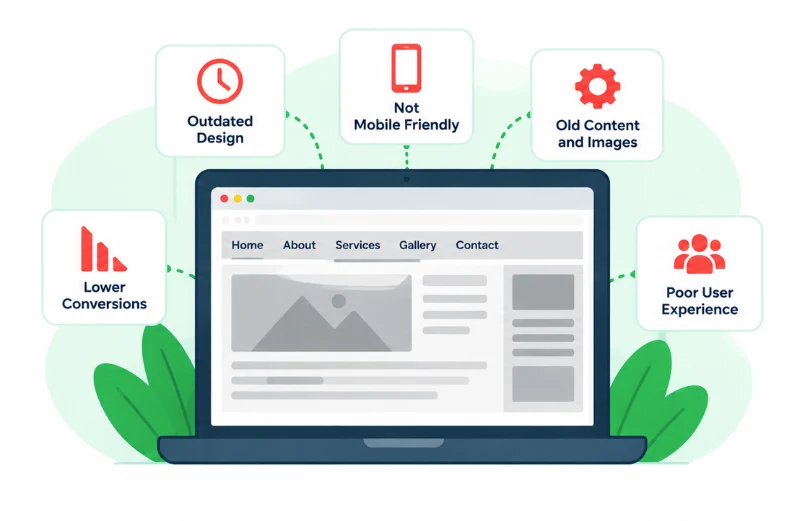
A website can look outdated even when the information on it is accurate. Common signs include cramped layouts, small text, dated imagery, inconsistent colors, cluttered navigation, and pages that are difficult to use on a phone. Sometimes the underlying design is fine, but years of added sections and conflicting styles have made the site feel disorganized.
For a small business, an outdated website can make it harder for visitors to understand your services, find the right information, or feel confident contacting you. Appearance matters, but usability, clarity, accessibility, and trust matter just as much.
Before committing to a complete redesign, identify the specific problems. Is the site difficult to navigate? Does the homepage fail to explain what you do? Are forms hard to complete? Are important pages missing? A focused update may solve those issues without rebuilding everything.

What WordPress Maintenance Plans Do You Offer for Utah Small Businesses?
No contracts. No Hassle.



How Much of My Website Should I Redesign?
Start with the pages that receive important traffic or generate inquiries: the homepage, core service pages, location pages, and contact page. Fix confusing navigation and inconsistent visual patterns across the site. If the overall structure works, a targeted refresh may be more efficient than a full rebuild.
Update the content before decorating the page
Review service descriptions, offers, contact details, team information, and calls to action. Remove expired promotions and duplicate sections. A polished layout cannot compensate for information that is inaccurate or hard to understand.
Improve visual consistency
Choose a small set of heading sizes, body-text styles, spacing rules, and button treatments. Use them consistently across pages. Avoid adding animations or decorative elements that interfere with readability and performance.
Make the website easier to navigate
Group services logically, simplify the main menu, and use descriptive link labels. Visitors should not have to guess where to find a service, a quote request, or a phone number. Add relevant internal links between related services and resources.
Protect search visibility during changes
Keep successful page URLs where practical. If URLs must change, map appropriate redirects and verify that important content, page titles, internal links, and indexing settings are preserved. A redesign that looks better but makes useful pages disappear can create unnecessary SEO problems. See our guide on why a website isn't ranking on Google.
Will a Website Redesign Improve My Google Rankings?
Not automatically. Better organization, useful content, mobile usability, and technical cleanup can support a stronger website, but a new appearance alone does not guarantee higher rankings. Redesigns can also cause temporary or lasting visibility problems if URLs, content, and technical settings are changed carelessly.
How Long Does a Small Business Website Redesign Take?
The timeline depends on the number of pages, content readiness, design complexity, forms and integrations, review cycles, and whether the existing website can be reused. A limited visual refresh may take less work than restructuring a large site. Establish the scope before choosing a launch date, and leave time for mobile testing and functional checks.
What Should I Check Before Launching a Redesigned Website?
Verify navigation, forms, email notifications, click-to-call links, responsive layouts, image loading, accessibility basics, redirects, and SEO settings. Test key actions on mobile and desktop. Maintain a reliable backup and a rollback plan. After launch, monitor inquiries, error reports, and search performance rather than assuming everything is finished.
Can Zindex Help Update an Outdated WordPress Website?
Yes. Zindex helps businesses improve existing WordPress websites and build new ones when the current foundation no longer fits. We can discuss whether your site needs a targeted refresh, a more substantial redesign, or ongoing updates. Explore our WordPress website development services, review maintenance options, or contact us to discuss your goals.
How Does It Work?
Give Your Website a More Professional, Up-to-Date Look
Your website should reflect the business you operate today, not the business you were years ago. Zindex helps small businesses improve WordPress design, content, navigation, and usability without making unnecessary changes.
Whether you need a focused refresh or a full rebuild, we can review what is working and what needs attention. Contact Zindex to discuss your website.

Step 1
Choose a WordPress Maintenance Plan
Browse our WordPress maintenance plans and select the option that fits your website and budget. Every plan is designed to keep your site updated, monitored, and protected.

Step 2
Connect and
Onboard
Once you sign up, we review your site and set up the systems needed to manage updates, backups, monitoring, and ongoing maintenance. Our WordPress maintenance services are put in place immediately so nothing is left exposed.

Step 3
Sit Back and
Relax
With Zindex managing your WordPress site, you are not worrying about updates or downtime. Your website stays stable and supported while you focus on running your business.
Frequently Asked Questions About Outdated Websites
Answers About Website Refreshes, Redesigns, and Modernization
Look for cramped layouts, tiny text, dated images, inconsistent styles, confusing navigation, and a poor mobile experience. Ask someone unfamiliar with the business whether they can quickly understand what you offer.
Compare WordPress Maintenance Plans & Features
No contracts. No Hassle.
Choose the WordPress maintenance plan that fits your website. All plans include monitoring, backups, and ongoing updates.
- Weekly Updates
- 24/7 Monitoring
- Hacked website solutions
- Daily Backups
- Performance Check
- Monthly Site Customizations
- Technical Support
Basic *
- Weekly Updates
- 24/7 Monitoring
- Hacked website solutions
- Daily Backups
- Performance Check
- Monthly Site CustomizationsMonthly Customizations
not included - Technical Support
Standard *
- Weekly Updates
- 24/7 Monitoring
- Hacked website solutions
- Daily Backups
- Performance Check
- Monthly Site CustomizationsLimited Monthly Customizations
- Technical Support
Professional *
- Weekly UpdatesDaily Updates
- 24/7 Monitoring
- Hacked website solutions24/7 Hacked website solutions
- Daily Backups
- Performance Check
- Monthly Site Customizations*Unlimited Monthly Site Customizations
- Technical Support
What Small Business Owners Say About Zindex
Small businesses trust Zindex to keep their WordPress websites secure, updated, and running reliably. From ongoing hosting and maintenance to full website rebuilds, our clients rely on us to manage their sites long term so they can focus on running their business instead of fixing website issues.